

Designing Inside the System
Why AI Is Changing Where Design Happens

Over the past year, AI tools have gone from interesting experiments to legitimate collaborators in how we build products. As that shift happened, something else became clear:
The traditional “handoff” between design and engineering is changing. It’s moving from static handoffs to vibe-coded prototypes—and, increasingly, toward working, foundational code that can be built on directly.

From Artifacts to Context
In a pre-AI workflow, design artifacts did most of the work.
A Figma file, a spec doc, a prototype—these were the containers for intent. Engineers translated that intent into code.
But AI changes the shape of that process.
Instead of interpreting static artifacts, AI systems rely on context:
What rules should be followed?
What patterns should be used?
What should not be done?
When that context is missing—or too broad—things fall apart quickly.
We’ve felt this firsthand. Taking a vibe-coded prototype and asking AI to “turn this into production code” sounds straightforward. In practice, the model gets lost. The problem isn’t capability—it’s lack of structure.
So we started shifting our approach.
Not away from design tools like Figma, but beyond relying on them as the final source of truth.
Two Tracks for Building
What’s emerged for us at Pendo is a workflow with two distinct—but connected—tracks.
1. The Exploration Track
This is where ideas move quickly.
Designers and PMs use tools like Claude, Cursor, or Figma Make to prototype flows, test concepts, and work through requirements. The goal isn’t clean code—it’s clarity.
We’re answering:
What are we actually building?
What does a good experience look like?
Where are the edge cases?
This phase is intentionally messy. Speed matters more than structure.
2. The Production Track
This is where things become real.
Work happens inside the actual frontend codebase:
Branches are created
Pull requests are opened
The experience is built against real constraints
Working in this environment, rather than in a separate, static space, shines a spotlight on consistency and alignment within the existing system.
The challenge we’re now faced with is navigating how we effectively translate between exploration and production.
Designing Inside the System
One of the most meaningful shifts in this workflow is where design actually happens.
In a traditional process, design lives outside the product.
We work in tools like Figma, creating a set of screens or flows based on what we think will be affected. Even with strong systems and regular critique, when we design in Figma or the like, we are operating at a distance—reconstructing parts of the product as a reference for engineers, rather than building directly inside the product our customers actually use.
That distance has always had tradeoffs, like:
How a new feature connects to existing functionality
What edge cases emerge across different parts of the product
Where small improvements could be made just outside the immediate scope
With this new approach, we’re starting to close that gap.
By creating lightweight, working versions of what we’re building—and eventually bringing that work into our frontend environment—we’re able to design much closer to the real system.
That changes the quality of decisions.
Instead of designing a set of pages, we’re able to:
Move through the product as a user would
See how new work interacts with what already exists
Identify opportunities and inconsistencies in real time
It becomes less about imagining the experience and more about feeling it.
We still sketch, explore, and communicate ideas outside of the vibe coded environment.
But we’re no longer limited to designing only what we can isolate—we can design within the broader system, which leads to more complete thinking and, often, better outcomes.
The Missing Layer: A Translation Step
Where we struggled most was trying to move directly from prototype to production.
We’ve experimented with taking a “fast,” vibe-coded prototype and asking AI (e.g. Cursor) to rebuild it properly inside our frontend repo. That didn’t work. The context was too large, the expectations unclear, and the output inconsistent.
What helped was introducing a deliberate step in between.
Instead of asking AI to build immediately, we ask it first to translate by breaking down the prototype into steps. We realized this was necessary after troubleshooting the problem with engineering. As a designer, I’m used to working across the full context of a problem space. But engineers are really good at breaking things down. This was the missing step to go from vibe-coded prototype to a foundational, surface-build in Pendo’s frontend repo.
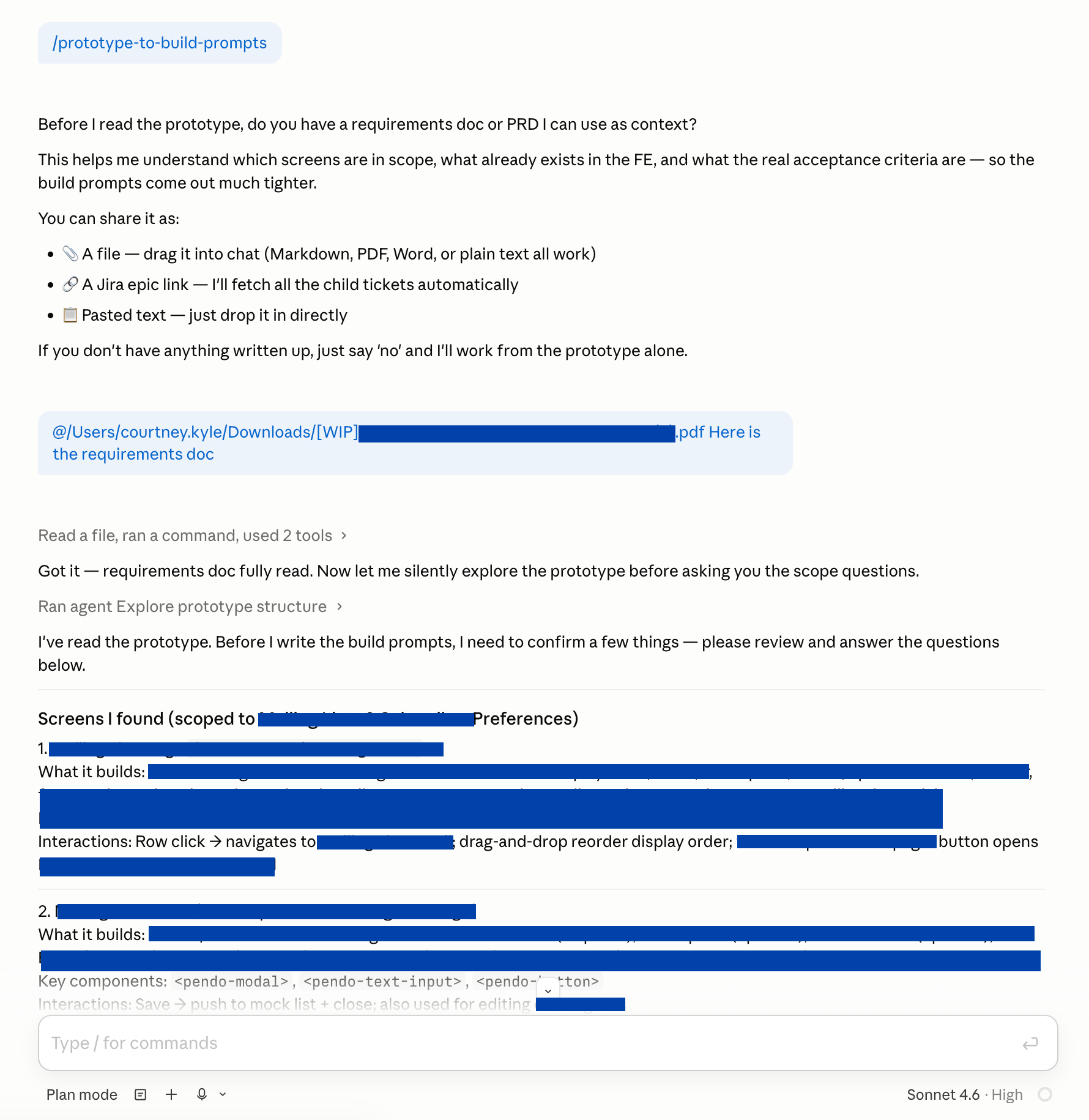
In order to build the translation, we’ve created a skill that, when run:
Confirms our requirements
Asks us questions to help us close any gaps
And then generates a structured list of tasks that enable us to rebuild it faithfully in a branch of our frontend environment
This becomes a kind of build contract to transfer exploration to production.
Creating Clear Boundaries
Once we move into the production track, we reinforce that contract with explicit context about how things should be built in the frontend for our purposes (design and handover).
Our production context packs include instructions that tell Cursor or Claude:
Build the UI surface only
Use mock data
Do not try to build or modify services or APIs
If something is too complex to build now, don’t force it — use placeholders and document it for engineering handover
Small .md files—notes, constraints, decisions—become incredibly useful. They guide the AI, but they also make the work cleaner for engineers picking things up.
Why the Frontend Matters
One thing that has made this workflow more viable for us is how our frontend environment is structured.
Our engineering team recently separated Pendo’s frontend and backend into distinct repositories. That change made the frontend codebase significantly more approachable for our tools.
Even with that improvement, there’s still an important distinction:
Exploration work is extremely fast
Production work, even AI-assisted, is still more constrained
That gap is actually useful.
It allows us to:
Discover quickly in the exploration track
Validate and refine before committing to the system
Then build a real surface in the frontend to uncover what we missed
Because prototypes don’t capture the full system, there are always gaps—missed connections, edge cases, or opportunities just outside the immediate scope.
Bringing work into the frontend earlier helps surface those.
And that, in turn, makes us better designers.
What This Changes (and What It Doesn’t)
This isn’t about designers becoming engineers.
If anything, it makes the boundaries clearer:
Exploration can move faster without breaking things
Production design work gets grounded in the reality of our system — which is the product our customers actually use
What is changing is the shape of collaboration.
Instead of handing off a static design, we’re moving toward a shared surface:
A working prototype
A structured plan
Clear documentation of what’s left
Less of a handoff, more of a handshake.
The Role of the Design System
I’ve always said design systems are just a database of good decisions that we want to repeat. They are the lego blocks we use to build the product our customers love.
Now more than ever, it is crucial for our teams to have a clear, structured database of components, patterns and tokens. Real code—clean, consistent code—matters. Our systems need to be machine-readable even more than they need to be human-readable because we’re all working in AI tools that will be looking into those coded patterns and .md rule files.
The design system isn’t just a library of components—it’s a source of structured knowledge:
Patterns
Constraints
Decisions we want repeated
And things we want to avoid
As AI becomes part of the workflow, that knowledge needs to be accessible in writing (code, .md files), not just visually in Figma.
What We’re Still Figuring Out
We’re early in this. I’m writing this while everything is still in flight. But while we used to joke about “building the plane while it’s in the air” in software, that is more true now than it ever was before because of the speed and evolution of AI. There’s no finish line. Just tides and cycles of change.
So here’s what we’re actively exploring right now:
How to structure context so AI can reliably work within a large codebase
And with that, where’s the best place to save and share this context—e.g. saved in the repo or installed more locally in our Cursor / Claude configs as rules and skills
How to make the transition from prototype to production faster with less prompting
How to balance speed with quality
How deep we go in the handoff — e.g. just printing out .md files with some notes on handover vs. generating Jira epics and tickets automatically
There’s no clean system yet. It’s still messy—and that’s part of the process.
A Simple Starting Point
If you’re experimenting with similar workflows, a few things have helped us:
Use fast prototyping to clarify requirements, not produce final code
Add a translation step and task breakdown before building—don’t jump straight from idea to implementation (avoid entering a never-ending prompt maelstrom)
Be explicit about constraints in your production environment
Have your AI keep continuous notes to support a strong handover
AI is accelerating how quickly we can generate ideas and interfaces.
But the real challenge is making sure those ideas translate quickly and clearly into production systems.
We’re still learning how to do that well—but creating a bridge between exploration and production has been a meaningful step forward.
Note: I’m smiling as I publish this today — I originally wrote this article a few days ago, but hadn’t had time to review and hit publish until this morning… the morning after Claude announced Claude Design.
It’s been exciting to watch this space evolve in real time. What tools like Claude are exploring brings many of these workflows even closer together — tightening the loop between idea, prototype, and code, and making that translation step faster and more seamless.
On a more personal note, this shift has changed how design feels.
As someone who enjoys painting, there’s something deeply satisfying about putting brush to canvas — the immediacy, the feedback, the sense of working directly in the medium itself. Increasingly, designing in code gives me a similar feeling. There’s a closeness to the work that’s hard to replicate when you’re operating at a distance.
Working in static frames or stitching together clickable prototypes can start to feel like approximating the real thing, rather than shaping it directly. The energy shifts when you’re designing inside the system itself — moving through real states, interacting with existing functionality, and seeing the impact of decisions immediately.
That’s the part that’s changed most for me. That’s the part that’s energized me enough to start writing on this blog again after letting it lie dormant for so long.
It feels less like creating a representation of the product, and more like working directly within it — like picking up a brush and painting on the canvas itself.
Have a lovely weekend — I’ll write again soon.